模塊介紹
Coding Style wiki
基本說明
補間動畫 (僅支持 DoTween Pro),透過 Inspector 配置補間軌道 (Position、Rotation、Scale、Size、Alpha、Color),支持 Normal、Reverse、PingPong、Sequence 播放模式與編輯器預覽 (Preview Mode),並可搭配 DoTweenAnimEvent 以 Parallel 或 Sequence 模式群組播放多個 DoTweenAnim (帶結束回調)。
- 版本:v1.0.4 (
com.michaelo.oxgkit.tweensystem) - 命名空間:
OxGKit.TweenSystem
主要組件 (Add Component):
- Add Component/OxGKit/TweenSystem/DoTweenAnim
- Add Component/OxGKit/TweenSystem/DoTweenAnimEvent
注意 本模組依賴 DoTween Pro (需自行購買安裝)、LWMyBox 與 OxGKit.TimeSystem,需先安裝依賴庫 (詳見 Installation)。
應用說明
補間軌道 (Tween Tracks)
DoTweenAnim 可於 Inspector 啟用以下補間軌道 (可複選),各軌道皆可獨立配置起訖值 (或 Sequence 序列點位)、時長 (duration)、緩動 (easeMode)、播放模式 (playMode) 與循環 (loopTimes / loopType):
| 軌道開關 | 補間目標 | 需求組件 (自動查找) |
|---|---|---|
tPositionOn | 位置 (Position) | Transform |
tRotationOn | 旋轉 (Rotation) | Transform |
tScaleOn | 縮放 (Scale) | Transform |
tSizeOn | 尺寸 (Size) | RectTransform |
tAlphaOn | 透明度 (Alpha) | CanvasGroup |
tImgColorOn | 圖片顏色 (Image Color) | Image |
tSprColorOn | 精靈顏色 (Sprite Color) | SpriteRenderer |
播放模式 (PlayMode)
- Normal:正向播放 (from → to)。
- Reverse:反向播放 (to → from)。
- PingPong:來回播放 (from → to → from)。
- Sequence:依序列點位清單依序播放 (此模式下 from / to 不生效)。
驅動模式 (DriveMode)
- Active:GameObject 激活時自動播放 (SetActive 驅動),支持循環 (Loop) 與間隔重播 (Interval)。
- Event:由 DoTweenAnimEvent 或代碼呼叫播放 (trigger 控制正反向),適合 UI 開關動畫。
Preview Mode
Preview Mode (Only DoTweenAnim component is supported)
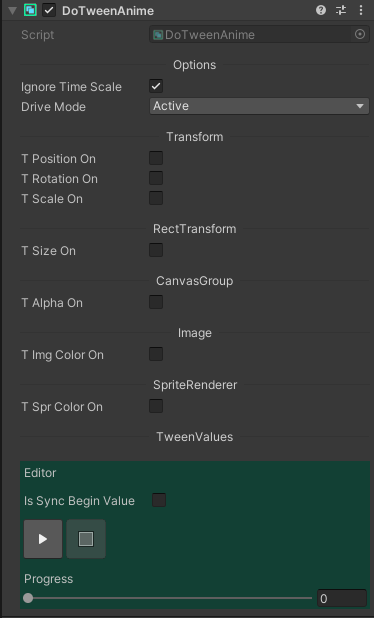
※Note: The DoTweenAnimEvent only plays at runtime.
[參考 Example]
簡單使用
群組播放 (DoTweenAnimEvent)
將多個 DoTweenAnim (DriveMode 設為 Event) 拖曳至 DoTweenAnimEvent 的清單中,即可由代碼統一播放:
using DG.Tweening;
using OxGKit.TweenSystem;
using UnityEngine;

public class PanelController : MonoBehaviour
{
    [SerializeField]
    private DoTweenAnimEvent _panelAnim;

    // 開啟面板 (正向播放)
    public void OpenPanel()
    {
        this._panelAnim.PlayNormal(() => Debug.Log("Panel opened"));
    }

    // 關閉面板 (反向播放)
    public void ClosePanel()
    {
        this._panelAnim.PlayReverse(() => this.gameObject.SetActive(false));
    }

    // 觸發切換 (每次呼叫正反向交替)
    public void TogglePanel()
    {
        this._panelAnim.PlayTrigger();
    }
}
Installation
| Install via git URL |
|---|
| Add https://github.com/cout-m6o/OxGKit.git?path=Assets/OxGKit/TweenSystem/Scripts to Package Manager |
第三方庫 (需自行購買安裝)
第三方庫 (需自行安裝)
- 使用 LWMyBox v1.1.4 or higher, Add https://github.com/cout-m6o/LWMyBox.git to Package Manager
- 使用 OxGKit.TimeSystem, Add https://github.com/cout-m6o/OxGKit.git?path=Assets/OxGKit/TimeSystem/Scripts to Package Manager
Create DoTween Assemblies
重要 匯入 DoTween Pro 後,需透過 Tools -> Demigiant -> DOTween Utility Panel -> Create ASMDEF 建立 DoTween Assemblies,本模組才能正確引用 DOTween.Modules。
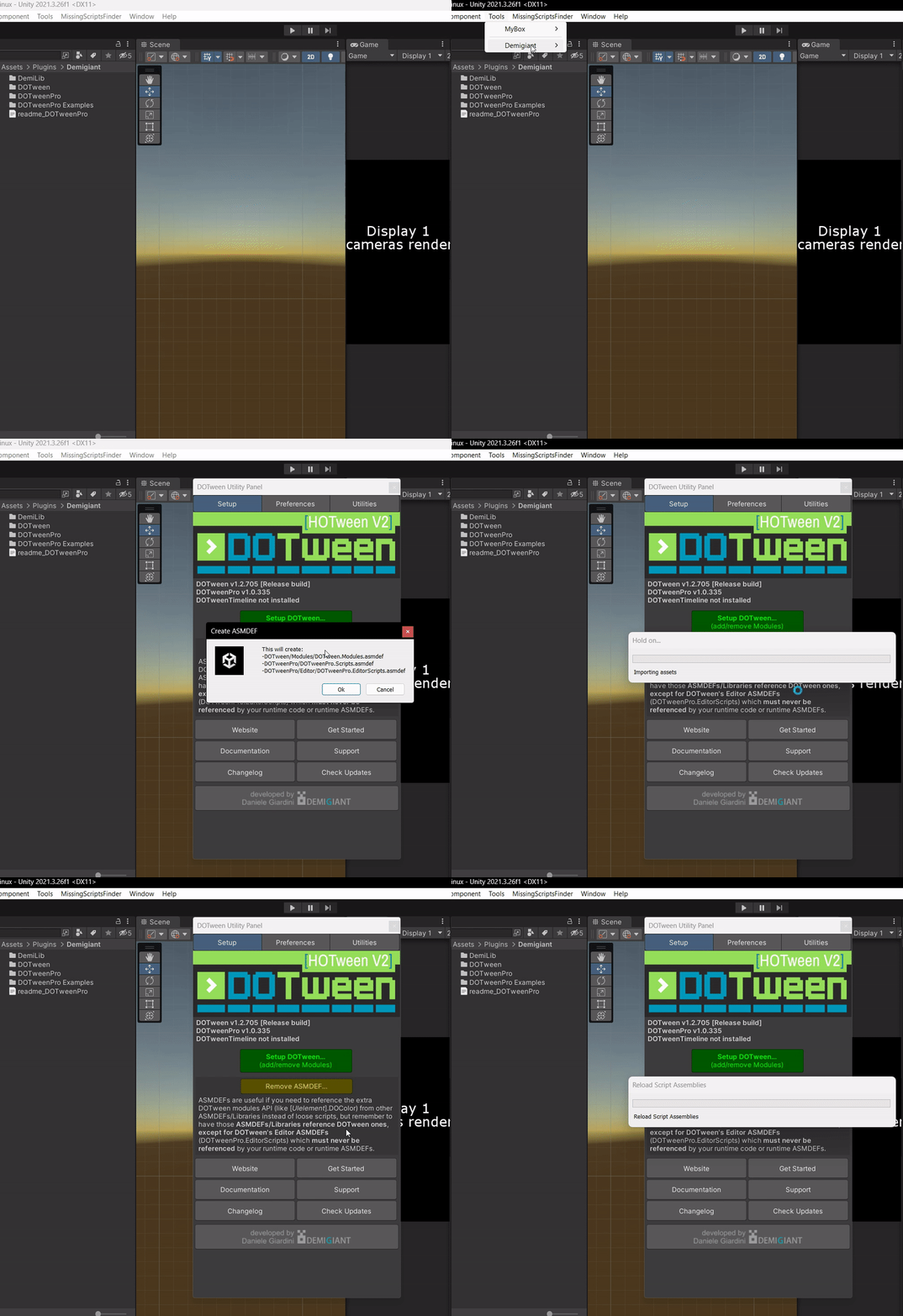
Samples (Package Manager -> Samples)
- AI Agent Skills (參考 AI Agent Skills)
- TweenSystem Demo
模塊 API
- Runtime
- DoTweenAnim (using OxGKit.TweenSystem)
- DoTweenAnimEvent (using OxGKit.TweenSystem)
Demo
TweenSystem Demo