Module Intro
Coding Style wiki
Basic Instructions
Tween animation (only supports DoTween Pro). Configure tween tracks (Position, Rotation, Scale, Size, Alpha, Color) in the Inspector with Normal, Reverse, PingPong, Sequence play modes and editor Preview Mode; combine with DoTweenAnimEvent to play multiple DoTweenAnims as a group in Parallel or Sequence mode (with end callbacks).
- Version: v1.0.4 (
com.michaelo.oxgkit.tweensystem) - Namespace:
OxGKit.TweenSystem
Main components (Add Component):
- Add Component/OxGKit/TweenSystem/DoTweenAnim
- Add Component/OxGKit/TweenSystem/DoTweenAnimEvent
Attention This module depends on DoTween Pro (must be purchased and installed by yourself), LWMyBox, and OxGKit.TimeSystem; install the dependencies first (see Installation).
Application Description
Tween Tracks
DoTweenAnim lets you enable the following tween tracks in the Inspector (multiple selections allowed); each track can be configured independently with from/to values (or Sequence waypoints), duration, easeMode, playMode, and loop settings (loopTimes / loopType):
| Track Toggle | Tween Target | Required Component (auto find) |
|---|---|---|
tPositionOn | Position | Transform |
tRotationOn | Rotation | Transform |
tScaleOn | Scale | Transform |
tSizeOn | Size | RectTransform |
tAlphaOn | Alpha | CanvasGroup |
tImgColorOn | Image Color | Image |
tSprColorOn | Sprite Color | SpriteRenderer |
PlayMode
- Normal: plays forward (from → to).
- Reverse: plays backward (to → from).
- PingPong: plays back and forth (from → to → from).
- Sequence: plays along a waypoint list in order (from / to are ignored in this mode).
DriveMode
- Active: plays automatically when the GameObject becomes active (SetActive-driven), supports Loop and Interval replay.
- Event: plays only when driven by DoTweenAnimEvent or code (trigger controls forward/backward), ideal for UI open/close animations.
Preview Mode
Preview Mode (Only DoTweenAnim component is supported)
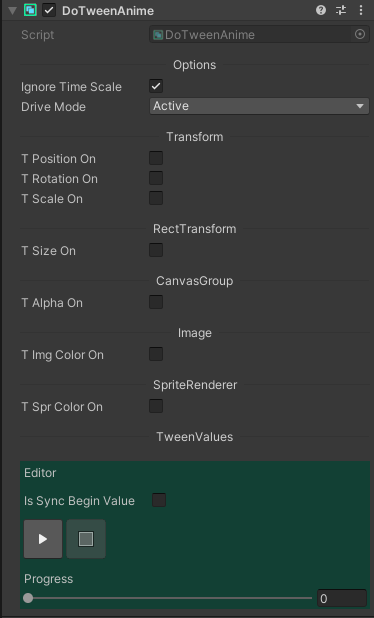
※Note: The DoTweenAnimEvent only plays at runtime.
[Refer to Example]
Simple Usage
Group Playback (DoTweenAnimEvent)
Drag multiple DoTweenAnims (with DriveMode set to Event) into the DoTweenAnimEvent list, then play them from code:
using DG.Tweening;
using OxGKit.TweenSystem;
using UnityEngine;

public class PanelController : MonoBehaviour
{
    [SerializeField]
    private DoTweenAnimEvent _panelAnim;

    // Open panel (plays forward)
    public void OpenPanel()
    {
        this._panelAnim.PlayNormal(() => Debug.Log("Panel opened"));
    }

    // Close panel (plays backward)
    public void ClosePanel()
    {
        this._panelAnim.PlayReverse(() => this.gameObject.SetActive(false));
    }

    // Trigger toggle (alternates direction on each call)
    public void TogglePanel()
    {
        this._panelAnim.PlayTrigger();
    }
}
Installation
| Install via git URL |
|---|
| Add https://github.com/cout-m6o/OxGKit.git?path=Assets/OxGKit/TweenSystem/Scripts to Package Manager |
Third-party libraries (must be purchased and installed by yourself)
Third-party libraries (must be installed by yourself)
- Use LWMyBox v1.1.4 or higher, Add https://github.com/cout-m6o/LWMyBox.git to Package Manager
- Use OxGKit.TimeSystem, Add https://github.com/cout-m6o/OxGKit.git?path=Assets/OxGKit/TimeSystem/Scripts to Package Manager
Create DoTween Assemblies
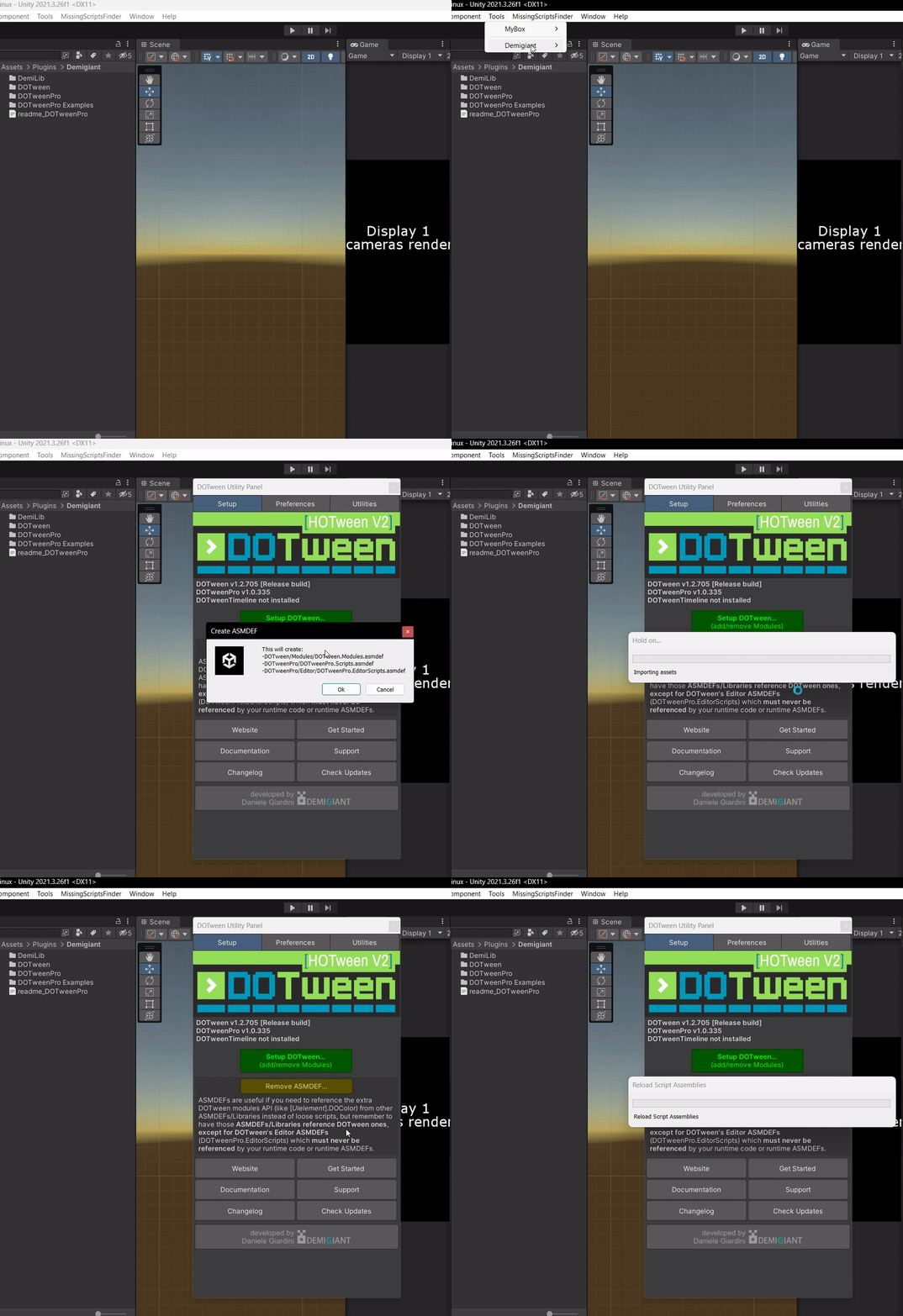
Important After importing DoTween Pro, you must create the DoTween Assemblies via Tools -> Demigiant -> DOTween Utility Panel -> Create ASMDEF so that this module can correctly reference DOTween.Modules.
Samples (Package Manager -> Samples)
- AI Agent Skills (refer to AI Agent Skills)
- TweenSystem Demo
Module API
- Runtime
- DoTweenAnim (using OxGKit.TweenSystem)
- DoTweenAnimEvent (using OxGKit.TweenSystem)
Demo
TweenSystem Demo