Module Intro
Coding Style wiki
Basic Instructions
A logging system that supports Cipher & Plaintext (freely convertible), dynamic configuration, and overriding existing loggers; it also provides global toggle, global level, global color, per-logger toggle, per-logger level, and per-logger color configurations.
- Version: v1.4.3 (
com.michaelo.oxgkit.loggingsystem) - Namespace:
OxGKit.LoggingSystem
Attention Most OxGKit modules (InfiniteScrollView, ActionSystem, NoticeSystem, InputSystem, TimeSystem, PoolSystem, Utilities) depend on this module for log output, so it is recommended to install it first.
Application Description
Create the Config File
- Create the config file via Right-Click Create/OxGKit/Logging System/Create loggersconfig.conf (automatically saved to StreamingAssets), making it easy to modify the config file on a real device for debugging and tuning.

- Configure via LoggingLauncher, or modify the config file in StreamingAssets directly.
Build Activation Symbol
Important When building (Build), you must add the following symbol to Player Settings -> Scripting Define Symbols, otherwise logs will not be output (not required in the Editor):
OXGKIT_LOGGER_ON
Config File Encoding Conversion
The config file supports conversion between BYTES [Cipher] and JSON [Plaintext] (Right-Click menu).
Reminder Cipher is recommended for release builds.

LoggingLauncher Configuration Interface
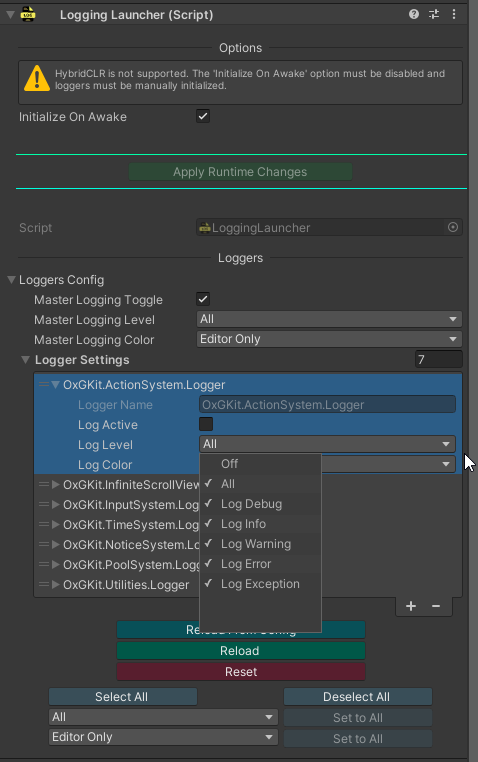
LoggingLauncher can configure logActive (toggle), logLevel (level), and logColor (color).
- Import the LoggingLauncher Prefab via Package Manager -> Samples, then drag it into the scene to activate the environment configuration (only needs to be activated once); it will automatically try to load the config file in StreamingAssets to control the log toggles.
Log Level
Log Level can be switched to the following:
- LogDebug (Print)
- LogInfo (PrintInfo)
- LogWarning (PrintWarning)
- LogError (PrintError)
- LogException (PrintException)
Table symbol legend:
- G = Global (global setting / Master Logging Level).
- P = Per-Logger (individual logger setting).
- Gx = A single global level: LogDebug / LogInfo / LogWarning / LogError / LogException.
- Px = A single per-logger level: LogDebug / LogInfo / LogWarning / LogError / LogException.
- G ∩ P = Flag intersection (bitwise AND), the set of levels allowed by both the global and per-logger settings.
Summary rule: A level (Log Level) is output only when both G and P contain that level.
| Global (G) | Per-Logger (P) | Effective Level (Output) |
|---|---|---|
| Off | Any | ✗ |
| Any | Off | ✗ |
| All | All | DEBUG / INFO / WARNING / ERROR / EXCEPTION → ✓ |
| All | Single Px | Px → ✓ |
Single Gx | All | Gx → ✓ |
Single Gx | Single Px | If Gx = Px → Gx → ✓; otherwise ✗ |
Any set G | Any set P | G ∩ P → ✓; if no intersection → ✗ |
Log Color
Log Color can be switched to the following:
- Disabled
- Enabled
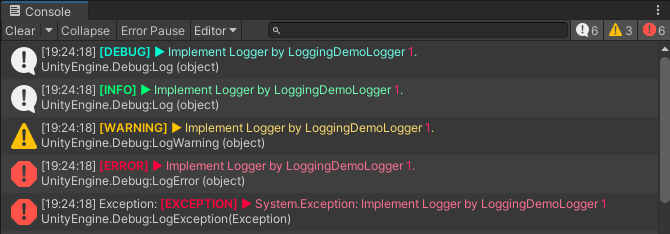
- EditorOnly (no RichText coloring in release builds)
| Global (G) | Per-Logger (P) | Effective Mode | Editor | Player / Build |
|---|---|---|---|---|
| Disabled | Any | Disabled | ✗ | ✗ |
| Enabled | Disabled | Disabled | ✗ | ✗ |
| EditorOnly | Disabled | Disabled | ✗ | ✗ |
| Enabled | Enabled | Enabled | ✓ | ✓ |
| Enabled | EditorOnly | EditorOnly | ✓ | ✗ |
| EditorOnly | Enabled | EditorOnly | ✓ | ✗ |
| EditorOnly | EditorOnly | EditorOnly | ✓ | ✗ |
Simple Usage
Implement a Custom Logger
After adding or removing a Logger, you must call LoggingLauncher.TryLoadLoggers() to reload (it is recommended to define a default constructor to avoid errors with HybridCLR + Activator.CreateInstance(type)).
using OxGKit.LoggingSystem;

[LoggerName("MyLogger")]
public class MyLogger1 : Logging
{
    // If use HybridCLR must create a default constructor
    public MyLogger1() { }
}
Override an Existing Logger
// Use same name to override MyLogger1
[LoggerName("MyLogger", true)]
public class OverrideMyLogger1 : Logging
{
    // If use HybridCLR must create a default constructor
    public OverrideMyLogger1() { }

    public override void Log(object message)
    {
        UnityEngine.Debug.Log("[Override]" + message);
    }

    public override void LogInfo(object message)
    {
        UnityEngine.Debug.Log("[Override]" + message);
    }

    public override void LogWarning(object message)
    {
        UnityEngine.Debug.LogWarning("[Override]" + message);
    }

    public override void LogError(object message)
    {
        UnityEngine.Debug.LogError("[Override]" + message);
    }

    public override void LogException(Exception exception)
    {
        UnityEngine.Debug.LogException(exception);
    }
}
Working with HybridCLR
When working with HybridCLR where the main project and the hot-update project are separated, you must manually split the creation of the Loggers initialization flow into AOT and Hotfix parts. Refer to the following:
// HybridCLR (must uncheck the "Initialize On Awake" option on LoggingLauncher):
LoggingLauncher.CreateLogger<LoggingDemoLogger1>();
LoggingLauncher.CreateLogger<LoggingDemoLogger2>();
LoggingLauncher.CreateLogger<LoggingDemoLogger3>();
LoggingLauncher.CreateLogger<LoggingDemoLogger4>();
LoggingLauncher.TryLoadLoggers();
The following initializes the AOT project's Loggers in the AOT project (the Hotfix project's Loggers must be initialized in the Hotfix project):

Dynamically Configure Loggers
// Reload LoggersConfig at Runtime (method 1)
var loggersConfig = new LoggersConfig
(
    new LoggerSettings("LoggingDemo.Logger1", true, LogLevel.LogDebug),
    new LoggerSettings("LoggingDemo.Logger2", true, LogLevel.LogWarning),
    new LoggerSettings("LoggingDemo.Logger3", true, LogLevel.Off)
);
LoggingLauncher.SetLoggersConfig(loggersConfig);

// Reload LoggersConfig at Runtime (method 2)
LoggingLauncher.ConfigureLogger("LoggingDemo.Logger1", false);
LoggingLauncher.ConfigureLogger("LoggingDemo.Logger2", true, LogLevel.LogWarning | LogLevel.LogError);
LoggingLauncher.ConfigureLogger("LoggingDemo.Logger3", false);
[Refer to the Example]
Installation
| Install via git URL |
|---|
| Add https://github.com/cout-m6o/OxGKit.git?path=Assets/OxGKit/LoggingSystem/Scripts to Package Manager |
Third-Party Libraries (must be installed manually)
- Uses LWMyBox v1.1.4 or higher, Add https://github.com/cout-m6o/LWMyBox.git to Package Manager
Samples (Package Manager -> Samples)
- AI Agent Skills (see AI Agent Skills)
- LoggingLauncher Prefab
- LoggingSystem Demo
Module API
- Runtime
- Logging (using OxGKit.LoggingSystem)
- LoggingLauncher (using OxGKit.LoggingSystem)
- LoggersConfig (using OxGKit.LoggingSystem)
- Editor
- LoggingHelper (using OxGKit.LoggingSystem.Editor)
Demo
LoggingSystem Demo
LoggingSystem Build Test